NEWYou can now listen to Fox News articles!
An invitation from a friend lands in your inbox. Something feels off, so you do the responsible thing. You email your friend to make sure the invitation is legitimate. A reply comes back confirming everything. You would probably feel comfortable clicking at that point, right?
That’s what makes a recent email from John in Westlake, Ohio, so unsettling. He received a suspicious Evite and decided to investigate. However, the response he received raised even more questions. John has since confirmed with his friend that the emails were part of a scam. His experience reveals a potential weakness in how we verify suspicious emails, especially when someone else’s inbox may be compromised.
Missed CyberGuy LIVE? Watch the replay and discover 5 ways to travel smarter and save money.
Our free CyberGuy LIVE class, 5 Ways to Travel Smarter and Save Money, has ended, but you can still watch the full replay. Kurt “CyberGuy” Knutsson walks you through five practical ways to protect your phone and personal information, avoid common travel scams, find better deals, save money on bookings and use technology to make your travels easier and less stressful. No technical experience is needed.
Watch the free replay + downloadable checklist now at CyberGuyLive.com.
FAKE CHATGPT BILLING EMAILS CAN STEAL YOUR LOGIN

When an unexpected invitation raises suspicions, taking a moment to verify the sender can help you avoid falling for a phishing scam. (Kurt “CyberGuy” Knutsson)
A suspicious Evite gets an unexpected reply
John received what appeared to be a fraudulent Evite from a friend. After reading our previous warnings about fake Evite emails, he decided to email his friend directly rather than click the invitation. What happened next made him even more suspicious.
Here’s what John wrote:
“I received what I thought was a fraudulent eVite from a friend. Thanks to your previous posts, I strongly suspected that this was a phishing attempt. So, I independently emailed my friend and asked if the eVite was legitimate. I got the response below.”
Hi John
This is from me, and I sent it, Sorry for the confusion,
Thank you
“It appears that the scammers either set up an auto-response on the Gmail account or manually responded to my email. The punctuation was wrong, so I didn’t consider the response legitimate.”
John thought the reply sounded unlike his friend and wondered whether someone had gained access to the account. He later contacted his friend again and confirmed that the emails were a scam. John also shared the actual Evite-branded invitation, which advertised a “Dinner Gathering & Celebration” and included a “View Invitation” button. Its polished design resembled a legitimate event invitation, showing how easily someone could mistake a fraudulent message for the real thing.
WHY VERIFIED SOCIAL MEDIA ACCOUNTS CAN STILL LEAD YOU INTO A SCAM
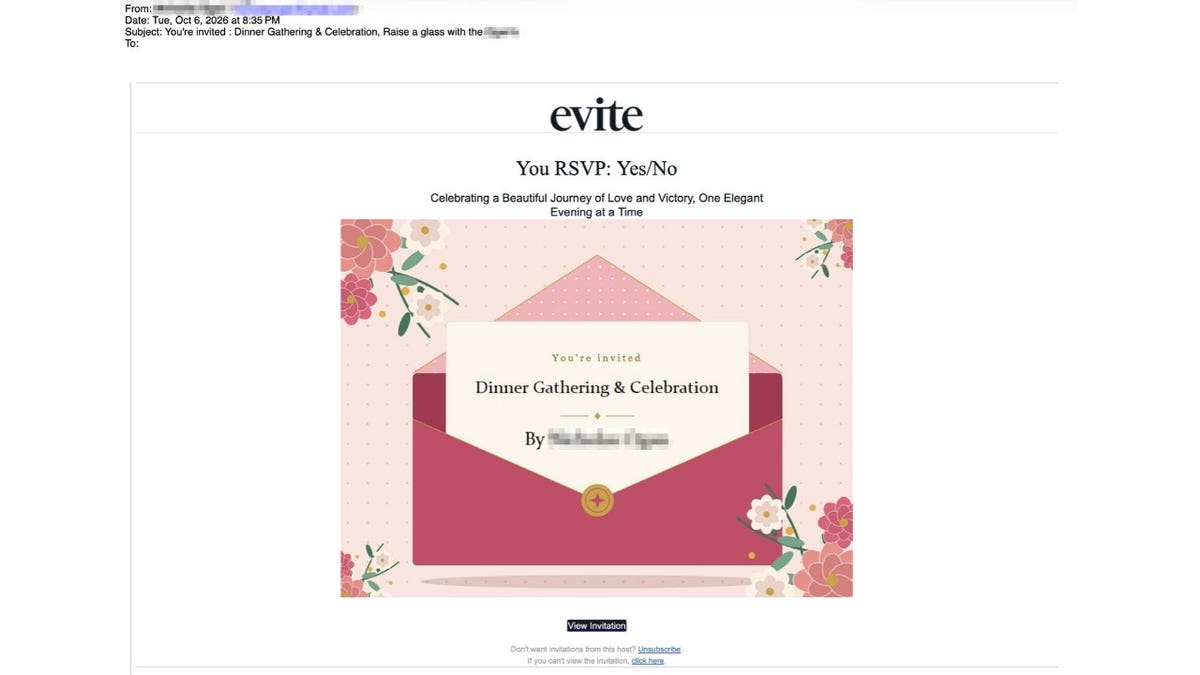
The Evite-branded invitation John received appeared to advertise a dinner celebration, but he later confirmed with the supposed sender that the emails were fraudulent. (Kurt “CyberGuy” Knutsson)
How a fake party invite scam could manipulate email replies
Most people know they should be cautious about unexpected links. In fact, we’ve repeatedly encouraged readers to verify suspicious messages before taking action. That remains excellent advice. However, there’s an additional concern when the email account you’re contacting may already be under someone else’s control.
The Federal Trade Commission warned in May 2026 about fraudulent invitations that imitate popular services such as Evite and Paperless Post. These messages may appear to come from someone you recognize. When you try to view the invitation, a fake website can ask for your email password or a verification code.
If criminals obtain access to that account, they may send more fraudulent invitations to the account owner’s contacts. The messages can appear to originate from a legitimate email address, making them especially convincing. Now consider what happens when someone replies to one of those invitations asking whether it’s real. If a criminal still controls the sender’s inbox, that person could potentially intercept the question and send a reassuring answer. A recipient might then believe the invitation is safe because a familiar email address confirmed it.
Could scammers set up automatic Gmail replies?
John wondered whether someone had configured an automatic response inside his friend’s Gmail account. Technically, that’s possible. Gmail allows users to create email templates and filters that automatically respond to certain messages. Someone with unauthorized access could potentially misuse that feature or simply respond manually while impersonating the account owner.
Although John confirmed the emails were fraudulent, we still don’t know how the reassuring reply was generated. There’s no technical evidence yet showing whether someone accessed his friend’s account, configured an automatic response or used another method to impersonate him. What John’s experience does demonstrate is that a reassuring email reply can accompany a confirmed scam.
What Evite says about the fake invitation scam
We reached out to Evite about John’s experience and asked whether the company was aware of this type of scam. In a statement provided to CyberGuy, Evite said:
“We’re not currently seeing a rise in phishing scams, however, staying aware is always important, which is why we’re constantly monitoring and providing tools to help users spot the fakes at evite.com/blog/etiquette/how-to-spot-phishing-email-scam/ . The best way to tell the difference is that a scam is generic, but a real gathering today is highly specific. Real hosts are over-communicating, sharing everything from parking instructions and dress codes to very specific themes like ‘Strawberry’ or ‘Western.’ That level of detail is what makes a modern invite harder to fake and gives guests the confidence to say ‘yes’ without second-guessing.
Evite advice? Check the details. If it just says ‘You’re invited’ with a link, be cautious. A real Evite host today is telling you where to park and what to wear.”
Evite’s advice is worth keeping in mind, although scammers can also create convincing invitations with specific event details. That’s why it’s important to take additional precautions before clicking an unexpected invitation.
If scammers gain access to a friend’s email account, they could potentially respond to your questions and make a fraudulent invitation appear legitimate. (Kurt “CyberGuy” Knutsson)
How to protect yourself from fake party invite scams
A few changes to how you verify unexpected invitations can help prevent a suspicious email from becoming a much bigger problem.
1. Call your friend instead of sending another email
If an invitation seems unusual, contact the sender using a phone number you already have. You can also reach out through another established communication channel, provided you have reason to trust that account. Avoid using phone numbers included in the suspicious invitation. A criminal could provide a fake contact number designed to make the story sound legitimate.
2. Treat unexpected login requests as warning signs
Be cautious if an invitation asks you to enter your email password or share a security code before revealing event details. A phishing website may use those requests to steal account access. If you expect an invitation from a particular service, open its official app or visit its website directly. Check whether the invitation appears in your account rather than following an unfamiliar link.
3. Watch for unusual replies from people you know
Pay attention if a familiar contact suddenly uses an unusual writing style or gives an answer that doesn’t fit the conversation. Unexpected requests to click another link should make you even more cautious. However, don’t rely entirely on spelling mistakes or punctuation. Criminals can write convincing messages, while legitimate emails may contain errors. The safest approach is to confirm the situation through another trusted method.
4. Use strong antivirus protection
Fake invitations can sometimes lead to malicious downloads rather than stolen passwords. In certain attacks, criminals disguise remote access software as something you need to install to view an invitation. Strong antivirus software can help identify dangerous downloads and block known malicious websites on supported devices. Keep your operating system and security software updated so you receive the latest available protections. If you accidentally downloaded an invitation file, avoid opening it. Run a security scan using trusted software. If you entered login credentials on a suspicious website, change them through the legitimate service immediately. Get my picks for the best 2026 antivirus protection winners for your Windows, Mac, Android & iOS devices at Cyberguy.com
5. Check your Gmail account for suspicious settings
If you suspect someone has accessed your Gmail account, review its settings for changes you didn’t make. An attacker may use forwarding or automated email rules to interfere with incoming messages.
On a computer, follow these steps:
- Open Gmail and click the Settings gear.
- Select See all settings .
- Open Filters and Blocked Addresses.
- Review the filters and look for unfamiliar rules, especially ones that automatically send templates or handle incoming messages unexpectedly.
- Check Forwarding and POP/IMAP for forwarding addresses or access settings you don’t recognize.
- Open General and review any automatic vacation response that may be enabled.
If you discover unfamiliar settings, investigate them and remove unauthorized changes. You should also secure your Google account and review recent sign-in activity.
6. Secure your email account before someone impersonates you
A strong, unique password helps protect your email. You should also enable two-factor authentication or use a passkey where supported. Passkeys provide stronger protection against phishing because they are tied to legitimate websites or apps. Visit your Google Account security settings at myaccount.google.com/security to review recent activity and connected devices. If you suspect unauthorized access, change your password using a trusted device and sign out unfamiliar sessions. A password manager can help you avoid reusing passwords across accounts. That way, one exposed password is less likely to compromise another service.
7. Use a data removal service to limit your personal information online
Scammers often use personal information found online to make fraudulent messages sound more convincing. Data brokers collect and sell details such as your email address, phone number and information about your family. A personal data removal service can help reduce that exposure by requesting that participating data brokers remove your information. Although no service can erase everything or prevent a friend’s email account from being hacked, limiting what’s available online may make it harder for criminals to personalize scams. Check out my top picks for data removal services and get a free scan to find out if your personal information is already out on the web by visiting Cyberguy.com
8. Report suspicious invitations and warn your contacts
When you encounter a fraudulent invitation, use your email provider’s phishing-reporting tools. In Gmail, open the suspicious message, select the three-dot menu and choose Report phishing . You can also report scams to the Federal Trade Commission at ReportFraud.ftc.gov. If the message appears to come from a friend, contact that person using another trusted channel. They may need to secure their account and alert other people who received similar invitations.
What to do if your friend confirms their email was hacked
If your friend confirms that someone accessed their account, avoid interacting with the invitation. Save the suspicious message as evidence and report it to your email provider. You may also want to check whether you received any follow-up messages containing unfamiliar links.
Encourage your friend to begin account recovery through their email provider’s official website. They should review their account activity and remove unauthorized access. If the scammer sent invitations to other contacts, your friend should warn those people through a communication method they still control. For Gmail users, Google provides instructions for securing a hacked account. Acting quickly may help prevent additional messages from reaching trusted contacts.
Kurt’s key takeaways
John’s email made me reconsider a piece of advice I often give. I’ve always encouraged people to contact someone they know when a suspicious message arrives. I still believe that’s smart advice, but how you reach that person is important. If their email account has been compromised, you could end up communicating with the scammer instead. Personally, I’d rather pick up the phone and call a number I already trust. I’m glad John trusted his instincts and followed up with his friend. He received a reply saying the invitation was legitimate, yet he kept questioning it. That extra effort helped him confirm the scam. We can’t assume every strangely worded email comes from a hacker, but we also shouldn’t ignore something that feels wrong. Scammers count on us trusting familiar names and email addresses. John’s experience shows why a little extra verification can be worth the effort.
CLICK HERE TO DOWNLOAD THE FOX NEWS APP
Have you ever questioned a suspicious email, only to receive a reassuring reply that still didn’t sound like the person you knew? Did you later discover their account had been hacked? I’d like to hear what happened so write to us at Cyberguy.com
Sign up for my FREE CyberGuy Newsletter
- Get my best tech tips, urgent security alerts and exclusive deals delivered straight to your inbox.
- For simple, real-world ways to spot scams early and stay protected, visit CyberGuy.com – trusted by millions who watch CyberGuy on TV daily.
- Plus, you’ll get instant access to my Ultimate Scam Survival Guide free when you join.
Copyright 2026 CyberGuy.com. All rights reserved.
Source: https://www.foxnews.com/tech/fake-party-invite-scam-trust-friends-reply
About the Author